原文:知乎文章
为了方便国际用户也体验到 DeepSeek Harness Remote - 随时随地继续你的工作,
这边我是接了Github 登录的,毕竟外国友人应该是没有知乎账号的。
然后众所周知,在OAuth 登录的最后一步,
是需要使用AccessToken 到授权站点获取用户信息的(理解OAuth 2.0)
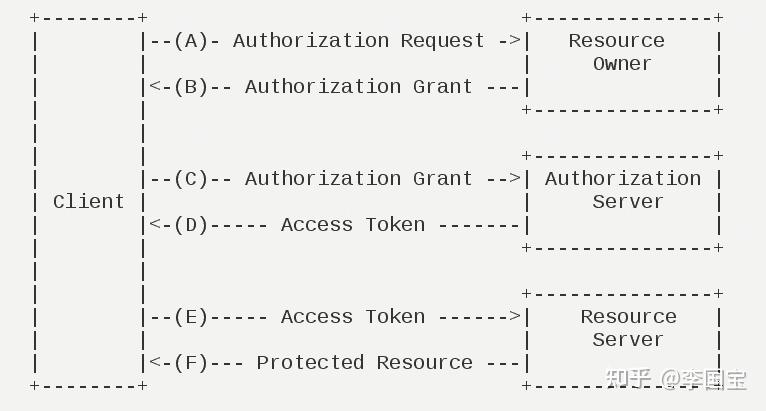
那接入了Github 登录,自然是需要在Server端访问Github API的。然后众所周知,Github 在国内云服务,也是处于时断时好的东西。那能怎么办呢?一般来说是走一层代理就好了,但是如果是自己搭一个开源代理方案,同時还需要管理鉴权和防护,维护起来是比较麻烦的。
想了一下,我手上是有一台海外服务器的,
而且是通过Tailscale 跨云组成了VPN内网,
也在我的k8s集群里面了。
ry-ssh7pa           Ready,SchedulingDisabled      <none>
vm-0-15-ubuntu      Ready                         control-plane,etcd
vm-0-8-ubuntu-new   Ready                         control-plane,etcd
vm-16-12-ubuntu     Ready                         control-plane,etcd
vm-28-17-ubuntu     Ready                         control-plane,etcd
➜  ~
那直接在这个ry-ssh7pa (海外节点)上部署一个能访问Github的API,
通过它去获取用户信息,那就完事了吧?~~~
流程如下:
deepseek-harness-server
  │ DSH_GITHUB_OAUTH_PROXY_URL
  ▼
github-egress-proxy.default.svc:3128
  ▼
Squid Pod(固定运行在 ry-ssh7pa)
  ▼
github.com / api.github.com
同时 squid 只允许Github 流量放行
acl SSL_ports port 443
acl CONNECT method CONNECT
acl github_oauth dstdomain .github.com
http_access deny CONNECT !SSL_ports
http_access allow CONNECT github_oauth
http_access deny all
k8s 的部署大概如下:
apiVersion: v1
kind: ConfigMap
metadata:
name: github-egress-proxy-config
namespace: default
labels:
app: github-egress-proxy
data:
squid.conf: |
visible_hostname github-egress-proxy
acl SSL_ports port 443
acl CONNECT method CONNECT
acl github_oauth dstdomain .github.com
http_access deny CONNECT !SSL_ports
http_access allow CONNECT github_oauth
http_access deny all
http_port 3128
cache deny all
pid_filename /tmp/squid.pid
coredump_dir /tmp
apiVersion: apps/v1
kind: DaemonSet
metadata:
name: github-egress-proxy
namespace: default
labels:
app: github-egress-proxy
spec:
selector:
matchLabels:
app: github-egress-proxy
template:
metadata:
labels:
app: github-egress-proxy
spec:
tolerations:
- key: node.kubernetes.io/unschedulable
operator: Exists
effect: NoSchedule
containers:
- name: squid
image: ubuntu/squid:6.6-24.04_beta
imagePullPolicy: IfNotPresent
ports:
- name: proxy
containerPort: 3128
protocol: TCP
readinessProbe:
tcpSocket:
port: proxy
periodSeconds: 5
timeoutSeconds: 2
failureThreshold: 6
livenessProbe:
tcpSocket:
port: proxy
periodSeconds: 20
timeoutSeconds: 2
failureThreshold: 3
resources:
requests:
cpu: 10m
memory: 32Mi
limits:
cpu: 250m
memory: 256Mi
securityContext:
allowPrivilegeEscalation: false
volumeMounts:
- name: config
mountPath: /etc/squid/squid.conf
subPath: squid.conf
readOnly: true
volumes:
- name: config
configMap:
name: github-egress-proxy-config
apiVersion: v1
kind: Service
metadata:
name: github-egress-proxy
namespace: default
labels:
app: github-egress-proxy
spec:
type: ClusterIP
selector:
app: github-egress-proxy
ports:
- name: proxy
port: 3128
targetPort: proxy
protocol: TCP
注意,这里走的的k8s 内网通讯!注意,这里走的的k8s 内网通讯!注意,这里走的的k8s 内网通讯!
( 内网才足够安全,这个还是不能被外部访问,不然有风险)
最后依旧是搭建了一个Proxy服务,只是受限的,安全的,也是稳定的。
国际友人也用上了DSH Remote了~!!!
( 手动狗头。
欢迎体验:DeepSeek Harness Remote - 随时随地继续你的工作
一个基于 DeepSeek Harness 插件机制构建的多端远程访问方案,通过安全、低延迟、端到端加密的 P2P 优先网络,支持从 PC、Android 和 Web 随时访问并操作远程 Harness。 (A multi-device remote access solution built on the DeepSeek Harness plugin system, enabling PC, Android, and Web clients to securely access and operate a remote Harness over a low-latency, end-to-end encrypted, P2P-first network.)