PS: Holiday’s coming, time for more tinkering!!
Manual dog head emoji
【Programming Tech Zone Disclaimer】
My last k3s article was written in 2025, using WireGuard for cross-cloud networking.
A year has passed, and WireGuard configuration is still too tedious.
—Every time you add a machine, you have to manually edit configs, add peers, adjust routes…
So this year, I decided to switch the underlying network entirely to Tailscale.
More specifically—self-hosting a Headscale control plane, without relying on the official SaaS.
This way, you can add as many nodes to the internal network as you want,
with a one-line command to join the network, no more manual WireGuard Peer configuration management.
At the same time, the k3s cluster has been upgraded from a humble 2-node version,
to an 8-node HA cluster with 4 Masters + 4 Edges.
Small but complete.
Let’s get to it.
Overall Architecture
First, here’s an architecture diagram for a global overview:
| |
Current cluster state:
| Node Name | Role | Tailscale IP | Status | Notes |
|---|---|---|---|---|
| vm-0-8-ubuntu-new | Master | 100.64.0.6 | Ready ✅ | Initial Master, –cluster-init |
| vm-16-12-ubuntu | Master | 100.64.0.5 | Ready ✅ | HA Master |
| vm-28-17-ubuntu | Master | 100.64.0.7 | Ready ✅ | HA Master |
| vm-0-15-ubuntu | Master | 100.64.0.10 | Ready ✅ | Headscale control plane node, NoSchedule |
| haru | Edge | 100.64.0.3 | Ready ✅ | Domestic node |
| lgb-amd-3700 | Edge | 100.64.0.4 | Ready ✅ | Local AMD host, 16GB |
| rainyun-ssh7pavp | Edge | 100.64.0.12 | Ready ✅ | Overseas Singapore node |
| hc1 | Edge | 100.64.0.9 | Ready ✅ | Domestic node |
8-node cluster running dozens of services, stable as a rock.
Part I: Setting up Tailscale - Cloud Internal Network Cluster
Why Not Manually Configure WireGuard Anymore?
In the 2025 article, I used the native WireGuard solution + k3s Flannel wireguard-native mode.
To be honest, WireGuard itself is very stable with good performance. But manually managing peers becomes a nightmare when you have multiple nodes:
- Every time you add a node, you need to update WireGuard configs on all other nodes
- Public key exchange and IP allocation are all manual
- If a machine’s public IP changes, all peers need to be updated
- No unified management interface
So this time, I went straight to Tailscale.
Why Self-host Headscale?
Tailscale’s official SaaS service is certainly convenient, and the personal plan now supports up to 100 devices, which is more than enough. But there are a few issues:
- Login requires external network—Tailscale login authentication uses Google/Microsoft/GitHub OAuth, basically unusable from mainland China without VPN, especially troublesome on servers
- Data control—All node information is on someone else’s servers, not reassuring
- Domestic access—Tailscale’s official coordination server is overseas, domestic nodes have unstable connections, occasionally slow to establish connections between nodes
So I chose Headscale—an open-source Tailscale control plane implementation.
Combined with Authentik for OIDC login, the experience is almost identical to official Tailscale, even more flexible.
Headscale Deployment
Server requirements: A small 2C2G machine is enough, I’m using Tencent Cloud Lighthouse Ubuntu 24.04.
The core is a docker-compose.yml containing:
| Component | Description |
|---|---|
| Headscale v0.28.0 | Tailscale control plane |
| Authentik 2025.2.4 | OIDC username/password login |
| PostgreSQL 16 | Authentik database |
| Redis | Authentik cache |
| Nginx | HTTPS reverse proxy |
After deployment, two domains are ready:
https://ts.example.com→ Headscale control planehttps://auth.example.com→ Authentik login management
I won’t expand on the detailed deployment process here (that’s for another article), but the key points are:
- Use acme.sh + Nginx for HTTPS, don’t mess with fancy Traefik stuff
- Configure OIDC in Headscale, with Issuer pointing to Authentik
- Use
100.64.0.0/10IP range, this is the CGNAT address range that won’t conflict with internal networks
Node Onboarding
After setting up Headscale, getting any machine on the network is a one-line command:
| |
The terminal will output a link, open it in a browser, it jumps to the Authentik login page, enter username and password, authorize—node is on the network.
That simple.
Key recommendation:
Don’t rely on public cloud internal networks!
Even if your Master nodes are in the same cloud, it’s recommended to communicate uniformly through Tailscale.
The reason is simple: public cloud internal networks are black boxes. When you change machines or availability zones, internal IPs change. While Tailscale IPs are allocated by you and won’t change.
All nodes, whether cloud-based, local, or on other cloud platforms, should uniformly access via Tailscale for a clean network architecture.
My current Tailscale network looks like this:
| |
No matter where you are, ping 100.64.0.6 works. This is what a proper internal network experience should be.
Part II: K3s Cluster Setup - Based on Tailscale Network
Core Principles
- All Master nodes in the same cloud region—My 4 Masters are all in Tencent Cloud, low etcd sync latency
- Masters communicate using Tailscale IPs—Don’t rely on cloud internal network
- Edge nodes anywhere—Home desktop, overseas VPS, office workstation, as long as Tailscale can reach
- Gateway nodes on high-bandwidth machines—Ingress runs on lightweight cloud with sufficient traffic
Installing Masters
Installation is actually straightforward, just follow the official docs: https://docs.k3s.io/quick-start
But there are a few critical parameters you must pay attention to.
First Master (initialize cluster):
| |
Subsequent Masters joining cluster:
| |
Core parameter explanation:
| Parameter | Why it’s necessary |
|---|---|
--cluster-init | First Master uses this, enables embedded etcd HA |
--flannel-iface=tailscale0 | Most critical! Makes Flannel VXLAN use Tailscale NIC, not physical NIC |
--node-ip=$(tailscale ip -4) | Node IP uses Tailscale IP, ensures cross-cloud communication |
--tls-san=<ip> | API Server certificate includes Tailscale IP |
INSTALL_K3S_MIRROR=cn | Domestic mirror acceleration, overseas nodes don’t need |
--flannel-iface=tailscale0 is the hard-learned lesson after countless pitfalls.
Without this parameter, Flannel will default to using the physical NIC’s IP (like public IP or cloud internal IP) to build VXLAN tunnels. The result is—same-cloud nodes can communicate, cross-cloud nodes have complete Pod communication failure.
With this parameter, Flannel’s VXLAN tunnels all go through the Tailscale virtual NIC, cross-cloud Pod communication is perfect.
Installing Edge Nodes
Edge nodes are Agents, even simpler.
Domestic nodes:
| |
Overseas nodes:
| |
The difference is domestic uses rancher-mirror.rancher.cn, overseas uses official get.k3s.io.
Domestic Docker Image Pulling Issues
I need to specifically mention: Docker/containerd image pulling in domestic environments is a big hassle.
Docker Hub, ghcr.io, gcr.io and other image sources are basically semi-blocked in China. Some k3s built-in system component images (like pause, coredns, metrics-server) might not be pullable, causing nodes to stay NotReady.
Several solutions:
- Configure image accelerators—Configure available domestic mirrors in
/etc/rancher/k3s/registries.yaml(if you can still find live ones) - Local export then import (recommended)—Pull images on overseas nodes or machines that can pull normally, export and transfer to domestic nodes for import:
1 2 3 4 5 6 7 8# Export on overseas node ctr -n k8s.io images export pause.tar registry.k8s.io/pause:3.9 # Transfer to domestic node scp pause.tar root@<domestic-node-IP>:/tmp/ # Import on domestic node ctr -n k8s.io images import /tmp/pause.tar - Self-host Harbor image registry—If you have many nodes, it’s recommended to set up a private image registry as a proxy cache, once and for all
My approach is to pre-pull needed images on overseas nodes, then ctr images export to export, transfer through Tailscale internal network to domestic nodes, and ctr images import to import. Though crude, it’s stable and reliable.
Get the token on the first Master:
| |
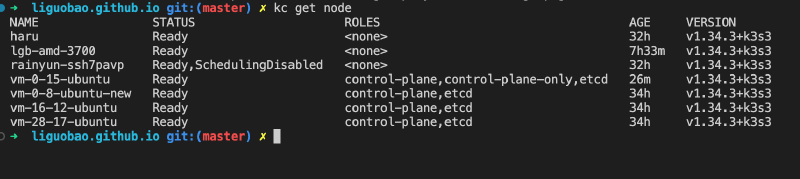
If everything’s fine, you’ll see new nodes online within seconds:
| |
All 8 nodes Ready.
Beautiful.
About Gateway Nodes
Ingress traffic entry requires public IP + sufficient bandwidth.
My approach:
- Gateway nodes use lightweight cloud servers—Tencent Cloud Lighthouse, Alibaba Cloud Lighthouse, etc., monthly payment of tens of yuan, traffic package is sufficient
- k3s built-in Traefik Ingress runs on all nodes by default (DaemonSet), but only one or two nodes need to be exposed externally
- Domain DNS resolves to these lightweight cloud public IPs
Traffic path: User request → Lightweight cloud public IP → Traefik Ingress → Service → Pod (can be on any node)
Even if the Pod is on an overseas node, no problem—Flannel over Tailscale will route the traffic.
Part III: Pitfall Chronicles
Pitfall 1: Flannel Using Wrong NIC (Hard-learned Lesson)
Symptom: Edge node is Ready, but cross-node Pod communication fails completely.
Cause: Didn’t add --flannel-iface=tailscale0, Flannel defaulted to public network NIC.
Diagnosis:
| |
Solution: Uninstall k3s agent, reinstall with --flannel-iface=tailscale0.
This parameter is so important, say it three times:
--flannel-iface=tailscale0--flannel-iface=tailscale0--flannel-iface=tailscale0
Pitfall 2: Unstable Tailscale Connection
A Vultr VPS had Tailscale connections dropping every few days.
Node kept bouncing between Ready and NotReady, kubelet frantically reporting unable to update node status.
Investigation revealed it was a VPN link issue, nothing to do with K3s.
Solution: First use taint to isolate, later just replaced the machine.
| |
Lesson: Better to remove unstable nodes than struggle. Replacing with a new machine is faster than troubleshooting network issues.
Pitfall 3: Don’t Run Business Pods on Low-spec Masters
My fourth Master (vm-0-15-ubuntu) only has 2G memory and also runs the Headscale control plane.
If you let it run business Pods, it’ll OOM in minutes.
Solution: Add NoSchedule taint, only run control plane components + etcd.
| |
2G memory running k3s control-plane + etcd + Headscale full stack, CPU and memory usage around 60%, holds up fine.
Part IV: Troubleshooting Quick Reference
Node added but having issues? Check in this order:
| |
90% of issues can be found in the first 4 steps.
Part V: Summary
Compared to the 2025 solution, key changes in this upgrade:
| Item | 2025 | 2026 |
|---|---|---|
| Networking | WireGuard manual config | Tailscale (Headscale self-hosted) |
| Control plane | Official Tailscale / manual WG | Self-hosted Headscale + OIDC |
| Master count | 2 | 4 (HA) |
| Edge nodes | 0 | 4 |
| Total nodes | 2 | 8 |
| New node onboarding | Change lots of configs | One-line command |
| Cross-cloud communication | Flannel wireguard-native | Flannel VXLAN over Tailscale |
| Management complexity | High | Low |
One-sentence solution summary:
- Use Tailscale (Headscale self-hosted) for underlying network—All nodes uniformly join, don’t rely on any public cloud internal network
- K3s Masters in same cloud region—Low etcd latency, stable control plane
- Edge nodes add freely—Home machines, overseas VPS, office workstations, as long as Tailscale can reach
- Gateway nodes use lightweight cloud—Cheap, sufficient bandwidth, fixed public IP
The entire cluster has been running for a month, stable as an old dog.
8/8 nodes all available (previously had 1 Vultr with network issues, already replaced).
Done.
Entire article completed in the study at dawn, Happy New Year everyone~
Manual dog head emoji
Related links:
- K3s Official Docs: https://docs.k3s.io/
- Headscale: https://github.com/juanfont/headscale
- Authentik: https://goauthentik.io/
- Previous article: Best Edge Computing Cluster Solution
This article was written with AI assistance.